

Outlook OST is Offline Storage Table. Every user is aware of its technical specifications. This data file (.ost) is a local copy of the server mailbox. It provides mailbox access to the user without an Internet. This profile-linked data file is also heavily secured. But sometimes owing to certain technical reasons, users face difficulty in accessing an OST. Such reasons range from data file or profile corruption to system failure. Since it is server dependent, any issue with the Exchange can prevent users from accessing it.
Let’s understand the scenario. The user urgently needs to access OST folders. But he is unable to access them. Server issues are creating hurdles. This is where the need to convert OST to PST without Outlook arises. Unlike the heavily-secured .ost file, outlook data file (.pst) is portable. The latter is easy to back up. Additionally, PST files can be opened in any profile. All these factors make PST a feasible option for long-term backup. However, such conversion (OST to PST) is not easy. Even though there are some manual functionalities, but they are risky. They risk the safety of mailbox data. The easiest way is to employ OST to PST converter software. Such tools are independent of Outlook. They are also not dependent on the exchange server. Checkout our guide titled “Best Methods to Convert OST to PST Without Outlook,” to know more.
Why a User Needs to Convert an OST to PST:
–For Data Recovery:
- When the Exchange Server crashes
- When the Exchange Server is not available
- To recover data from orphaned OST files
- To retrieve data from orphaned OST files
- Data recovery from a corrupt OST
–For Data Migration:
- Moving to a new profile
- Moving to a new email client and the new client doesn’t support an OST
–For Data Recovery:
- To move older emails from server for archiving
- To reduce OST file size for better space optimization
Converting OST to PST Using Outlook:
A user can utilize some built-in functionalities to perform this task. Experts strongly advocate to create data backup first. Check the below guide:
Method 1: Employing the Import/Export Feature (Outlook Required):
First access to the original Outlook profile. Then follow below instructions:
—Go to the File
—Browse Open & Export
—Then navigate to the Import/Export option
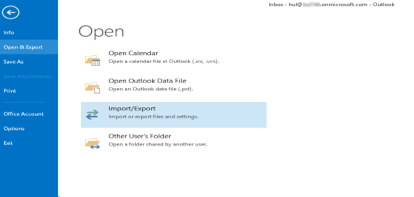
—At this point, the utility will ask to select an action
—Choose Export to a file
— Press Next

— From the dropdown, select ‘Outlook Data File (.pst).’
—Then click ‘Next’.

—At this stage select email message folders.
— Check the Include Subfolders options as well. Then hit Next.
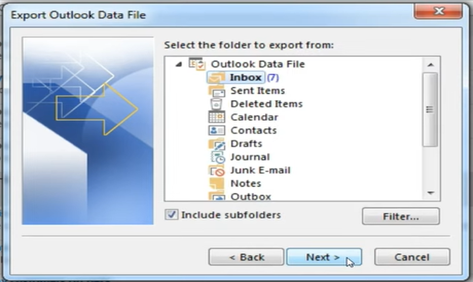
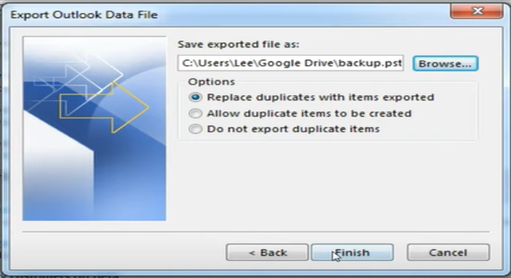
—Now provide the file location. Also check “Replace duplicate ….exported.”
—Click Next.
Why the Above Method May Fail?
The above functionality work efficiently in certain scenario. Firstly, the user has the access to the original Exchange server environment. Secondly, the Outlook app is working properly. Thirdly, the OST is healthy.
Circumstances when this functionality may not work include the following:
- Orphaned OST: The above method will not work on an orphaned data file (.ost).
- A Damaged File: It will not work if the data file is corrupted.
- An Oversized File: It may fail on an oversized data file.
- No Exchange Server: It will not work in the absence of the Exchange server.
How to Convert OST to PST Without Outlook?
As discussed earlier, all built-in functionalities are Outlook dependent. They will also fail when the exchange server is not available. In addition to this, they will not work on orphaned OST. Then the question arises what options are available to the user to overcome such an impasse. The remedy lies in an advance OST to PST converter software. Such tools are capable of reading the OST structure from the system’s hard drive. They are also extremely easy to use. People rely more on software like Stellar Converter for OST. This tool has built-in capabilities to interpret the proprietary format of an OST file. It is capable of reading not only OST encryption but also its data hierarchy. Most importantly, it is known for its quick conversion speed.
Benefits of Using Stellar Converter for OST:
—No Outlook required
—Extremely friendly GUI
—Capability to independently read the Offline Data File (OST) structure
— Can interpret the proprietary format of an OST file
— Capability to extract attachments from an inaccessible OST
— Can recover mailbox components from an orphaned data file
— Can efficiently manage oversized files
Conclusion:
In the above guide, we have explored multiple circumstances where a user urgently needs to convert an Outlook data file (.ost) to the PST format. We have explored manual method (Import/Export Functionality). But this method will not work without Outlook. It will also fail in case of an orphaned data file (.ost). Now the query started can we convert OST to PST without Outlook? The answer is yes. For this, a user needs some OST to PST converter software. It is one of the best and safest methods. This tool can perform the conversion independently of Outlook. With advanced capabilities, tools like Stellar Converter for OST can fix issues with orphaned data files (.ost). They can extract attachments and email messages from severely damaged files as well. Their friendly interface promises easy selection, preview as well as conversion.